MCP Servers are surprisingly easy. I made one that runs code in a sandbox.
Originally posted on runno.dev ↗I have this side project
It’s called Runno, it lets you run code anywhere (safely). It’s an open-source sandbox that works inside, or outside the browser. You can learn more about that in another article: A WebAssembly Sandbox for Running Code.
tl;dr - it lets you run Python, Ruby, C++, and other languages inside JavaScript:
import { runCode } from "@runno/sandbox";

const result = await runCode(
  "ruby",
  "puts 'Hello JavaScript!'"
);

console.log("Ruby says:", result.stdout);
Which would output:
Ruby says: Hello JavaScript!So I gave a presentation about this whole thing at MelbJS and someone said “You should make an MCP Server for Runno”.
At which point I was like “What actually is an MCP server?”.
Model Context Protocol
It’s a protocol for giving context to models.
Okay that seems obvious, but basically it lets you build tools that an LLM can use. Here’s an example:
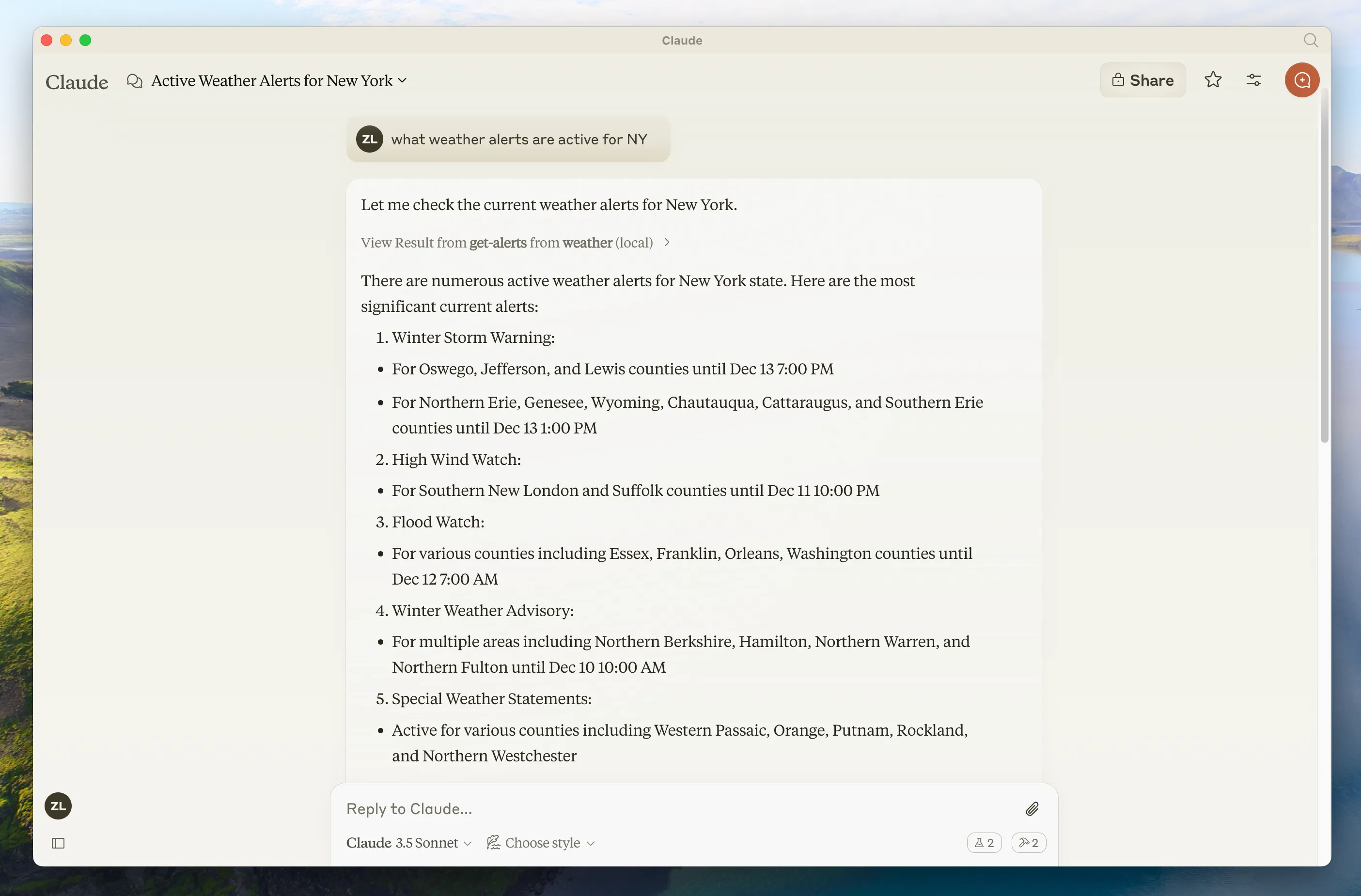
In this example you can see Claude using a get-alerts tool to generate a
response to a user query. First it uses the tool, then it answers the user’s
question.
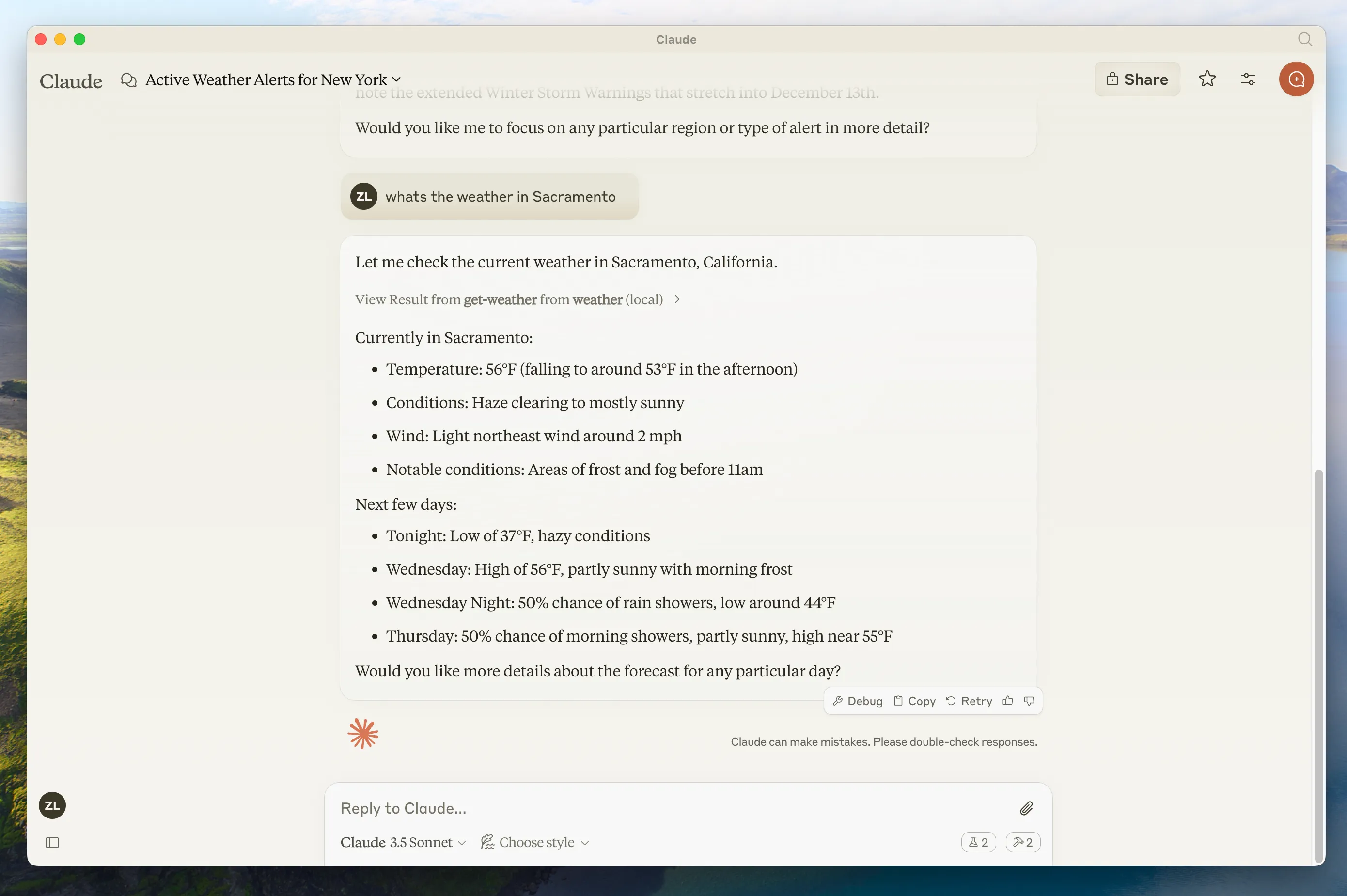
In this example you can see Claude using a get-weather tool to get the current
weather in Sacramento.
Learn more: modelcontextprotocol.io
This is a powerful idea
I think of tool use as the LLM equivalent of smartphone “Apps”. Back when the iPhone came out it was a very cool device, but it wasn’t until we got Apps that Smart Phones became extremely useful and powerful. Most people only use a few Apps each day, but each person uses very different Apps because they have very different tasks they want to do.
MCP is similar to Apps, but the App is for the LLM, not for you. You interact with the app through the LLM. This makes your LLM way more capable of achieving the random niche tasks that you want to do. I can’t expect Anthropic to build an integration for Depop (the app I spend most of my time in), but I could expect Depop to build an MCP server that allows any LLM to call Depop tools. Then I can finally find and list my vintage shirts using Claude.
So MCP is like “Apps” but for the LLM. With the added bonus that these tools can be composed into pipelines by the LLM. So if I had an MCP that identified clothing styles in an image, I could chain that with Depop to find clothes in a particular style. Sure, you’re probably not interested in that use case, but you probably have your thing that interests you.
But they can be dangerous
You’ve probably heard of ✨ Prompt Injection ✨. Similar to SQL Injection, prompt injection is caused by the original sin of Computer Science: mixing instructions and data. LLMs, at a fundamental level, can’t tell the difference between information and instructions. Sure, you can teach them lots of neat tricks, but those tricks are probabilistic and not at all a sure thing.
Security becomes a major concern when your MCP combines the lethal trifecta:
- Access to Private Data - like your collection of vintage shirts
- Ability to Externally Communicate - like listing a vintage shirt for sale
- Exposure to Untrusted Content - like reading a listing for a vintage shirt
Reference: simonwillison.net/2025/Jun/16/the-lethal-trifecta/
When your LLM can do all of those three things with an MCP (or through the combination of MCPs) then it can be exploited by a bad actor to leak information. In this case a would-be attacker could discover exactly how much money I’m wasting on vintage clothing.
Code Examples
Now that you’re suitably scared, let’s look at some code. My goal here is to convince you that writing an MCP server is super easy, it’s not to accurately document or guide you through building one. So go somewhere else for that (sorry).
Lets look first at the run_code tool I built. The job of this tool is to run
a snippet of code in the language of your choice.
I started with a Zod schema to describe the parameters. This helps make sure they are valid inputs.
const RunCodeSchema = z.object({
  runtime: z.enum([
    "python",
    "quickjs",
    "clang",
    "clangpp",
    "ruby",
    "php-cgi",
  ]),
  code: z.string(),
});
Then I created a description, which you can think of like a prompt. This helps the LLM know how to use the tool you’ve created.
const runCodeTool = {
  name: "run_code",
  description: `
Run code in a sandboxed environment.

[...]

Use this tool for the following scenarios:
 * Running a complex calculation to get an accurate answer
 * Solving a problem that requires an algorithm
 * Generating statistics or analysing data
 * Seeing the result of a small snippet of code run in isolation
 * Debugging code by running small snippets
 * Testing code by running small snippets

You can use STDOUT to print out results so that you can use them.
Following execution you'll be provided with the STDIN, STDOUT, and
STDERR combined in the form of TTY output.

[...]
`,
  inputSchema: zodToJsonSchema(RunCodeSchema),
  annotations: {
    title: "Run Code Using Runno Sandbox",
    readOnlyHint: true,
    idempotentHint: true,
  },
};
Note: I’ve truncated the prompt for this article
Next I needed to respond to two requests: Listing Tools, and Calling Tools. This was also extremely straightforward.
For listing tools, I just return that runCodeTool:
server.setRequestHandler(ListToolsRequestSchema, async (request) => {
  return {
    tools: [runCodeTool],
  };
});
And then for calling tools:
server.setRequestHandler(CallToolRequestSchema, async (request) => {
  const { name, arguments: args } = request.params;
  if (name === "run_code") {

    // Grab the validated arguments from the Schema
    const { runtime, code } = RunCodeSchema.parse(args);

    // Now just call my library
    const result = await runCode(runtime, code, {
      timeout: TIMEOUT,
    });

    // Handle converting the return type into text for the LLM
    const type = result.resultType;
    switch (type) {
      case "complete":
        return {
          content: [
            {
              type: "text",
              text: `Execution completed with exit code ${result.exitCode}.`,
            },
            {
              type: "text",
              text: `Following is the TTY output.`,
            },
            {
              type: "text",
              text: result.tty,
            },
          ],
        };
      case "crash":
        return {
          content: [
            {
              type: "text",
              text: `Execution crashed with error ${result.error.type}: ${result.error.message}.`,
            },
          ],
        };
      case "terminated":
        return {
          content: [
            {
              type: "text",
              text: "The program was terminated.",
            },
          ],
        };
      case "timeout":
        return {
          content: [
            {
              type: "text",
              text: "Execution timed out.",
            },
          ],
        };
    }
  }
  throw new Error("Tool not found");
});
And that’s basically it. There’s a little bit more code to get the server running but you could get one of these going for your favourite API in less than an hour.
What’s really neat is that there is a debugging interface you can use to connect
to the MCP super easily. So you can try it out without having to connect it to
your LLM - just use @modelcontextprotocol/inspector.
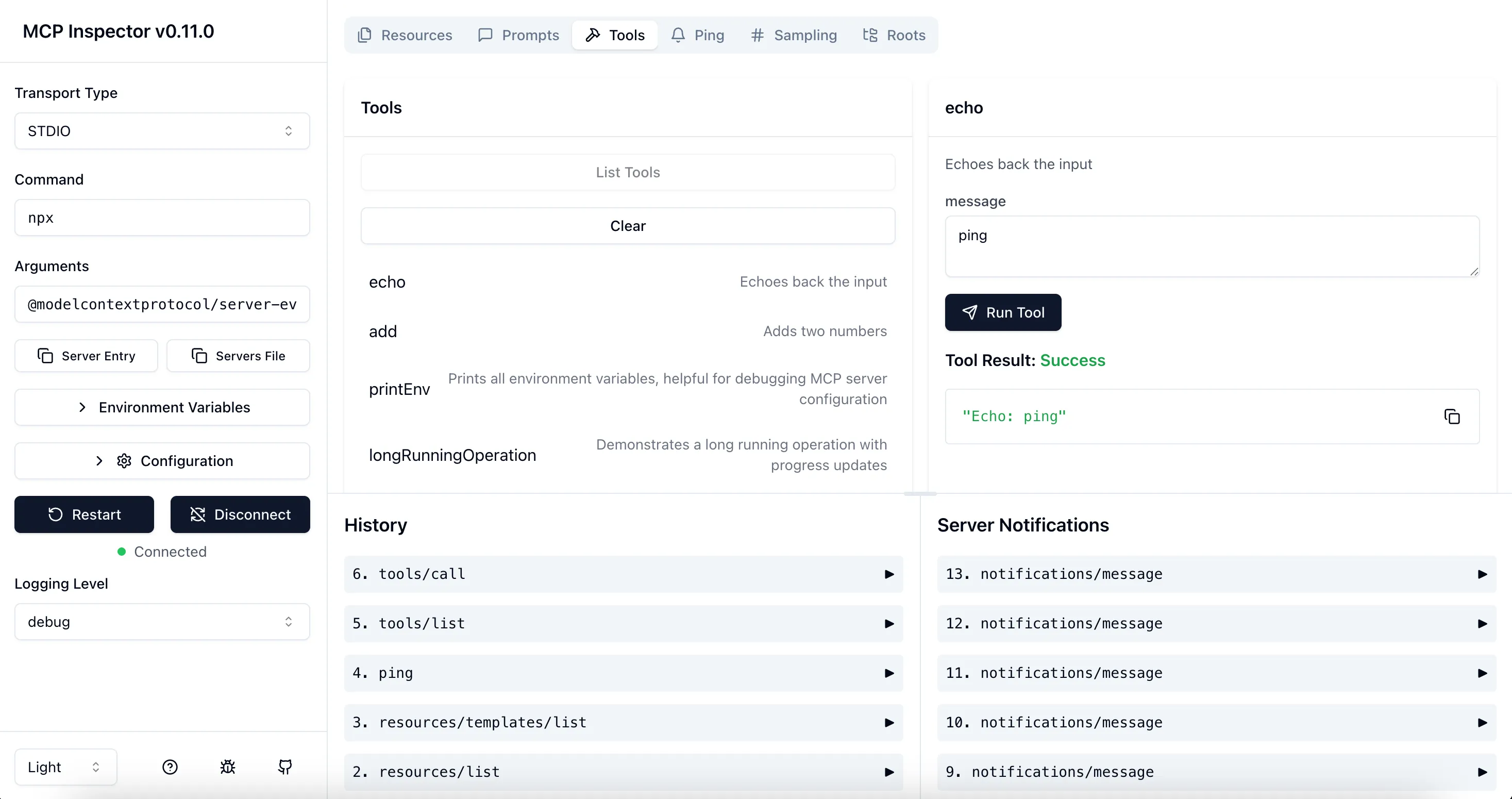
Adding @runno/mcp to your LLM
The Runno MCP server is on npm, so you can run it with npx. Here is the example
configuration for setting it up with Claude. But you can use it with whatever
LLM interface you use.
{
  "mcpServers": {
    "runno": {
      "command": "/usr/local/bin/npx",
      "args": ["@runno/mcp"]
    }
  }
}
Once it’s set up then your LLM will just use it as a regular part of queries:
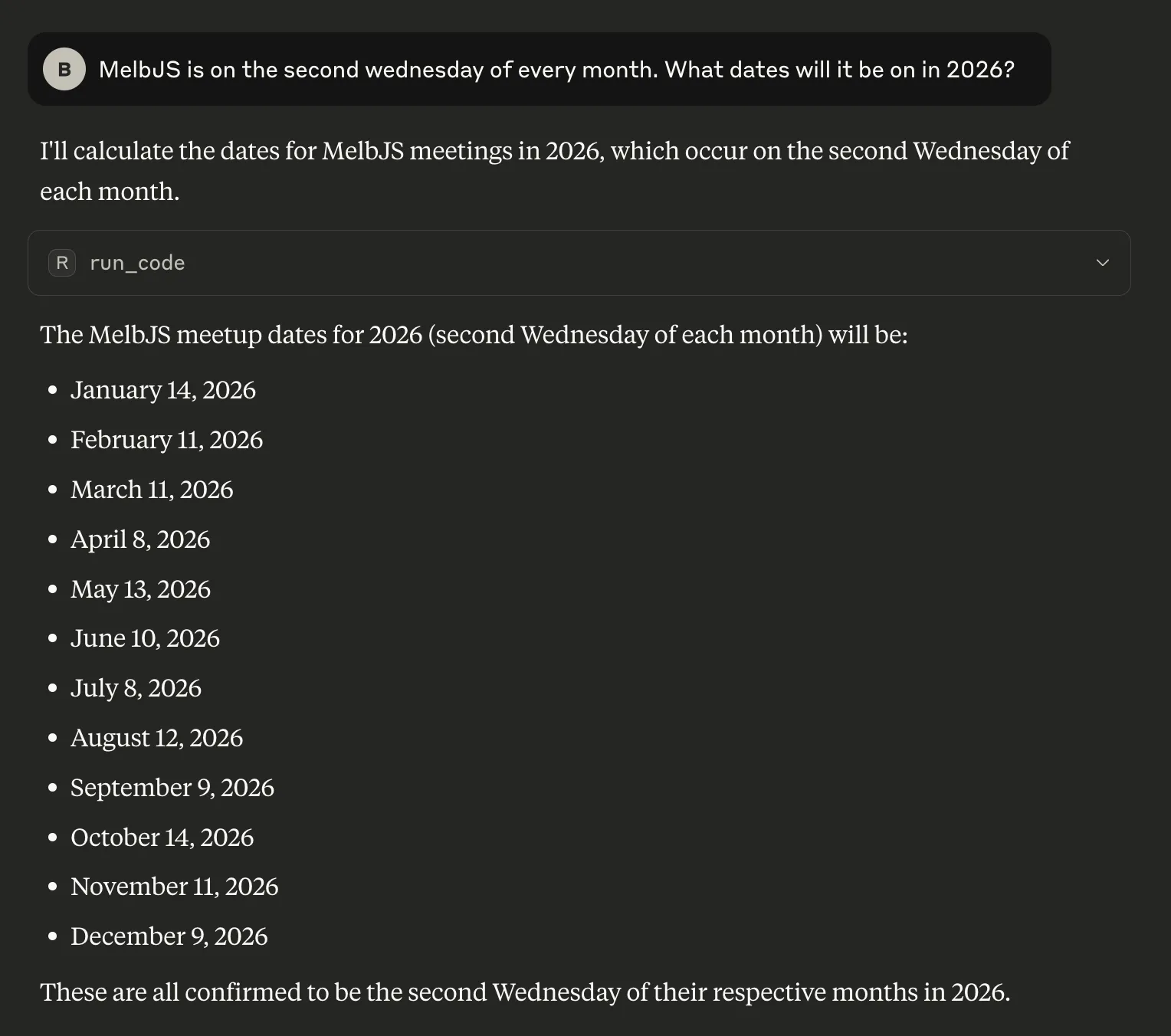
Internally it has written some Python to calculate the result:
{
  `code`: `
import calendar
from datetime import datetime, timedelta

def find_second_wednesday(year, month):
    \"\"\"Find the second Wednesday of a given month and year\"\"\"
    # Find the first day of the month
    first_day = datetime(year, month, 1)

    # Find the first Wednesday
    days_until_wednesday = (2 - first_day.weekday()) % 7  # Wednesday is weekday 2
    first_wednesday = first_day + timedelta(days=days_until_wednesday)

    # Add 7 days to get the second Wednesday
    second_wednesday = first_wednesday + timedelta(days=7)

    return second_wednesday

# Calculate MelbJS dates for 2026
year = 2026
melbjs_dates = []

for month in range(1, 13):
    second_wed = find_second_wednesday(year, month)
    melbjs_dates.append(second_wed)
    print(f\"{calendar.month_name[month]}: {second_wed.strftime('%A, %B %d, %Y')}\")

print(f\"\
MelbJS 2026 dates:\")
for date in melbjs_dates:
    print(f\"- {date.strftime('%B %d, %Y')}\")
`,
  `runtime`: `python`
}
This kind of tool use is really helpful for LLMs, because it gives them support in figuring out things they are bad at (like maths) by turning it into a task they are good at (writing code). Just like me.
I’ve also had it do some contrived tasks like:
- Solve this Sudoku (I just gave it an image)
- Tell me the shortest path between two locations on a cycleway
- Generate a visualisation of the Mandlebrot set in ASCII
I can imagine it also being helpful for:
- Giving coding examples with accurate results
- Plugging into an Agentic workflow
- Making your local LLM as good as the commercial ones
If you’d like to try it out, you can check it out on NPM (@runno/mcp).
Thanks for reading, and if you want to hear more of this stuff you can follow me on LinkedIn. I can’t believe I’m saying that but honestly in a professional context it’s the best way to see what I’m up to.